The Complete Beginner’s Guide: How to Become a VTuber from Start to Finish

Introduction: What is a VTuber?
A VTuber, short for Virtual YouTuber, is a content creator who performs through a digital avatar instead of showing their physical appearance. This creative format first gained momentum in Japan. Since then, it has evolved into a global scene with creators across gaming, music, education, and entertainment.
VTubers produce a wide variety of content, including:
- Gaming streams
- Interactive chat sessions
- Music performances
- Educational or commentary content
What makes VTubing especially appealing is creative freedom. Your avatar becomes an extension of your imagination, helping you create a persona without camera anxiety or traditional branding limitations.
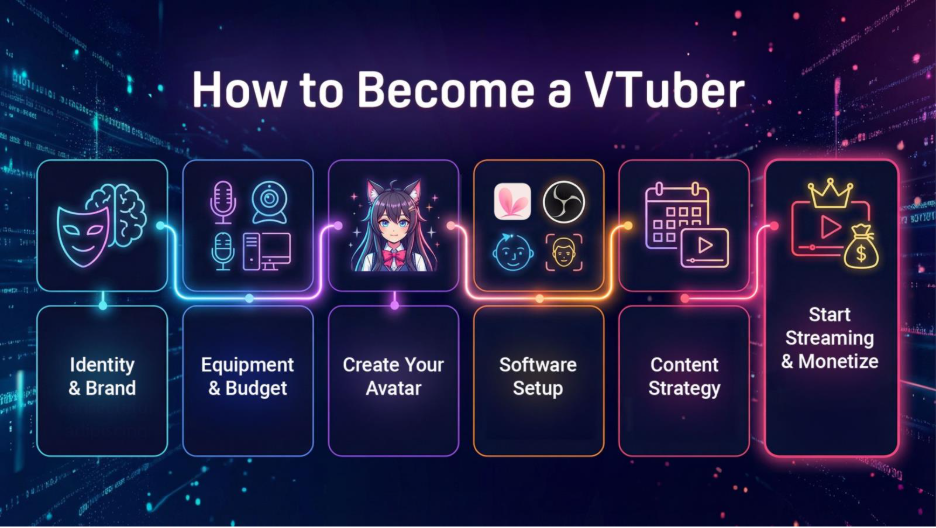
This guide is designed as a central resource hub for beginners learning how to become a VTuber. It covers identity, equipment, avatars, software, content strategy, and monetization, step-by-step.
Further reading: VTuber Essentials
Step 1: Define Your Virtual Identity and Brand
Before buying equipment or designing an avatar, define who your VTuber is.
Persona Building
Your VTuber persona should amplify parts of your real personality, not replace them. The best VTuber identities still feel human under the avatar.
If you are calm, chaotic, educational, or comedic, lean into it. Pick a vibe that feels natural on your best days and your tired days.
Consistency
Choose a concept you can sustain long-term. A magical creature, a café-themed character, or a sci-fi explorer can all work. The key is simple: you need to enjoy embodying the role consistently.
A helpful question to ask yourself: Would I still like being this character 5, 15, or 30+ streams from now?
Growth Strategy
Your VTuber identity cannot exist only during livestreams. Discoverability today depends on short-form platforms like YouTube Shorts, TikTok, and Instagram Reels. Your character’s voice, visuals, and tone should remain recognizable everywhere. Keep your naming, colors, and vibe consistent.
Further Reading: How to Grow as a VTuber: Practical Strategies & Exposure Tactics
Step 2: Select Equipment and Plan Your Budget
Starting VTubing doesn’t require expensive gear, but prioritization matters.
Essential Gear
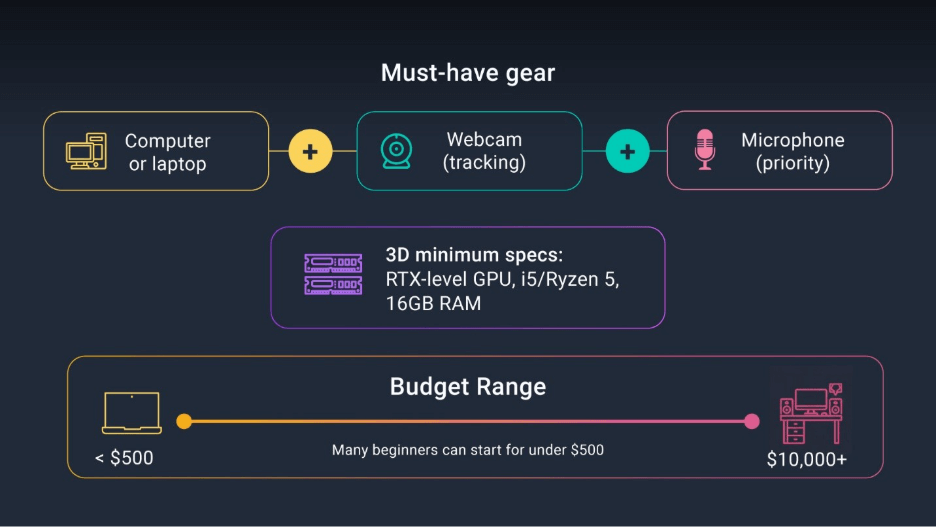
At minimum, beginners need:
- A reliable computer or laptop
- A webcam for face tracking
- A quality microphone
Audio quality should be your first upgrade. Viewers are far more forgiving of simple visuals than distorted or unclear sound.
Hardware Specifications
If you plan to run a 2D or 3D avatar and stream at the same time, you’ll want a setup that can handle real-time rendering plus OBS and whatever content you’re running (e.g., games, virtual studio, et cetera).
A practical baseline for 3D VTubing, recommended minimum specs include:
- A modern GPU that can handle 3D workloads (e.g., RTX-level GPU)
- A mid-range CPU (e.g., Intel i5 or Ryzen 5)
- 16 GB RAM
Cost Range
The cost to start VTubing can range from free, using what you already own, to full studio builds that can cost over $10,000. A realistic beginner plan is to start small, then upgrade one piece at a time, with initial setups being well under $500. Again, use what you already own to get started and combine that with free tools as you build your skills and confidence. If you want a detailed breakdown, we already have one that maps typical costs across avatar types and gear.
Step 3: Create Your Virtual Avatar
Your avatar is the visual core of your VTuber identity. It can be 2D or 3D, free or custom-made.
Free 3D Models (VRM)
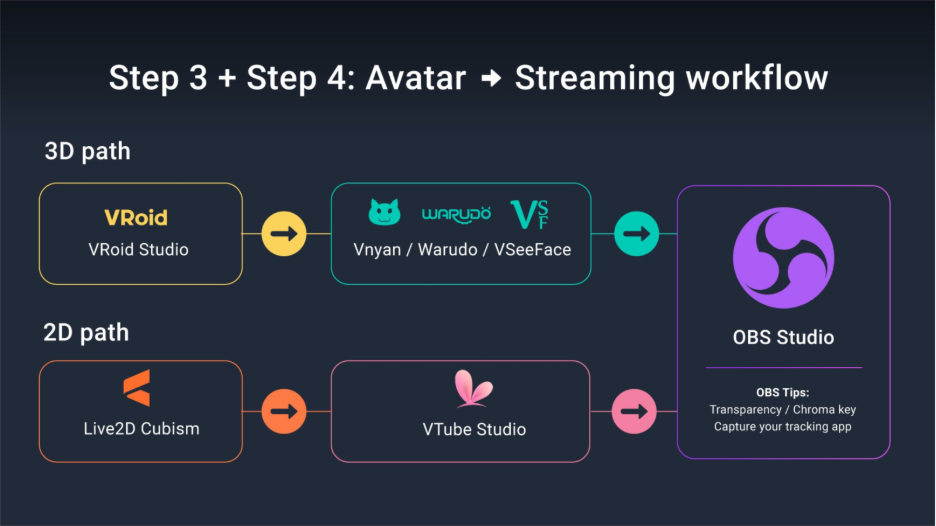
If you want a beginner-friendly path, VRoid Studio is a common and powerful free starting point. It’s widely used anime-style 3D avatars with exportable VRM files.
If you want a full walkthrough that connects avatar creation to streaming setup, this guide is the cleanest bridge for beginners.
Custom 2D Models (Live2D)
Custom Live2D models can look amazing, offering stylized, expressive looks. Typical pricing ranges from $500 to $5,000+, depending on art quality and rigging complexity.
Understanding Rigging Value
High Live2D prices reflect specialized labor. Rigging is not a drag-and-drop solution. It usually requires meticulous changes and tweaks, like:
- Separating artwork into layers and meshes
- Building deformers for movement
- Tuning blending parameters for expressions
- Adding physics for hair and accessories
- Testing, fixing, and testing again…
Free 2D Models (No Drawing)
If you want to avoid drawing or rigging entirely, there are still options to get started.
Our free 2D avatar guide uses Mannequin Character Generator (MCG) and walks through a workflow that gets you steaming with presets in under an hour.
Further Reading:
- How to Start VTubing with Free 3D Tools
- How much does it cost to be a VTuber?
- Live2D Rigging: Why 2D VTuber Models Cost More Than You Think
- Live2D Cubism Tutorial: Rigging Your 2D VTuber Model
Step 4: Choose and Configure Your Software
Your software setup connects your avatar, tracking, and livestream into one system.
3D Tracking Workflow
A common beginner workflow includes:
- VRoid Studio for avatar creation
- Warudo or Vnyan for facial tracking
- OBS Studio for streaming
Further reading: How to start VTubing for FREE!
2D Tracking Workflow
Live2D models are animated using Live2D Cubism and tracked via software such as VTube Studio, or free alternatives like Inochi Session + Puppetstring.
Streaming with OBS Studio
In OBS, a simple starter setup is:
- Add your avatar source
- Add a Game Capture or Screen Capture source
- Add your mic and basic filters
- Keep your layout readable
OBS Plugins
Plugins can significantly upgrade your stream. For example, the Multistream plugin allows simultaneous streaming to platforms like YouTube and Twitch, improving reach without extra effort.
Further Reading:
- How to Start VTubing with Free 3D Tools
- How to Capture VTube Studio in OBS Using the Spout2 Plugin
- How to Use VIVERSE as a Source in OBS
Step 5: Develop Your Content Strategy
Content strategy determines long-term growth more than avatar quality, so let’s review some tips.
Consistency is Key
A predictable schedule helps viewers build habits around your channel.
Start with something you can actually keep:
- One stream a week
- Once clip after each stream
- One short post to tell people you exist
That may seem so little, but it’s an action that can begin the momentum for more exposure.
Exposure Over Stream Time
A common misconception is that streaming longer guarantees growth. Discovery often comes from clips and highlights, not raw stream time.
You can stream fewer hours and still grow if you ship consistent clips.
Niche Strategy
Smaller niches can help you stand out early. It’s easier to become “that VTuber who does X” than “a VTuber that does everything. “Good Yapping” Technique
Silence kills retention. Constant narration keeps new viewers watching.
Think of “good yapping” as verbally reacting to what you see and explaining what you’re thinking. Practice so it feels less unnatural when your chat begins filling up.
Audience Engagement
Let chat influence outcomes: naming characters, choosing story paths, or voting on challenges. Participation builds familiarity, camaraderie, and loyalty.
Further Reading: How to Grow as a VTuber: Practical Strategies & Exposure Tactics
Step 6: Start Streaming and Monetization
Launch
Don’t wait for perfection. Viewers connect with enthusiasm, consistency, and authenticity more than technical polish.
Your first stream can be as simple as:
- One avatar scene
- One main content scene
- One BRB scene
That it’s. Click the button to go live, learn on the fly, and adjust as you go.
Sources of Income
Common revenue streams include:
- Platform earnings (YouTube Ads, Super Chats, Twitch subscriptions)
- Fan support (Patreon, Ko-fi, tips, memberships)
- Sponsorships and brand deals
- Merch and digital products
The Harsh Reality of Cuts
Fees vary by platform and payment method. Cuts can be significant, especially when app stores and platforms take their share. For example:
- Platforms often take 30% or more of donations or subscriptions
- Mobile payment systems may add another 30% fee
- Corporate VTubers may share 30–50% of income with agencies
Income Inequality
Like most creator economies, VTubing tends to be top-heavy. Some creators earn a lot, many earn a little, and most build slowly over time.
The good news is you don’t need to make it big to be successful. You can build a sustainable niche channel with realistic goals and diversified income streams.
Further Reading: How Much Do VTubers Really Make? Breaking Down the Numbers
Your VTuber Resource Hub
The barrier to entry for VTubing has never been lower. While tools and avatars matter, long-term success comes from consistency and connection.
As you grow, you can also bring your VRM avatar into immersive spaces. For example, you can use VIVERSE Worlds as part of your stream setup, your content, or as a place to hang out with your community.
Use the resource center below to keep leveling up. This post is your starting point. The rest of the hub is your upgrade path!
Navigate Your Journey: The VTuber Resource Center
| VTuber Resource Topic | Purpose & Depth | Article Link |
| Cost & Budget Planning | Detailed breakdown of 2D/3D model, equipment, and hidden expenses. | How Much Does It Cost to Be a VTuber |
| Income & Monetization Reality | Explores platform cuts, agency splits, income inequality, and diversification strategies. | How Much Do VTubers Really Make? |
| Free 3D Avatar Creation | Step-by-step tutorial using VRoid Studio, Warudo (or VNyan), and OBS. | How to Start VTubing with Free 3D Tools |
| Live2D Rigging Value | Explains the high cost and technical skills required for professional 2D models. | Why Live2D Rigging Is So Complex |
| Live2D Cubism Tutorial | The technical handbook: Outline covering PSD prep, Art Mesh, Parameters, and Rigging steps. | Learn Live2D Cubism Tutorial |
| Free 2D Avatar (No Drawing) | Quick start guide using tools like Mannequin Character Generator. | How to Make a 2D VTuber Avatar FREE Without Drawing or Rigging |
| Growth & Exposure Strategy | Practical tips on multi-platform content, niche selection, and continuous commenter. | How to Grow as a VTuber |