VRM Models Explained: Why This 3D Avatar Format Powers VTubers and Virtual Worlds

The VTuber market reached USD 3.13 billion in 2026 (Mordor Intelligence, 2026). Almost all of its 3D growth runs on a single open file format, and that format is VRM. VRM models are royalty-free 3D humanoid avatars built on the glTF 2.0 standard. One file works in VTuber apps, virtual worlds, and the browser, which is why creators keep picking it.
TL;DR
- VRM is an open, glTF 2.0-based 3D avatar format with a built-in humanoid rig, blendshapes, and license metadata.
- VRM 1.0 launched in September 2022. The Khronos Group joined the VRM Consortium in October 2024 to push global standardization (Khronos Group, 2024).
- Get a VRM three ways: VIVERSE Avatar Creator (free, browser), VRoid Studio (free, desktop), or Blender plus UniVRM.
- A typical VRM file is 5 to 50 MB, far smaller than its GLB equivalent (vrm.dev).
What Is a VRM Model?
A VRM model is a 3D humanoid avatar file built on top of glTF 2.0 (VRM Consortium, 2024). glTF 2.0 is the open 3D scene standard from the Khronos Group. VRM files use the .vrm extension, and they’re designed for first-person VR and real-time use. Generic 3D scenes and offline rendering aren’t the target.
Dwango and Pixiv founded the VRM Consortium to solve one specific problem: portable avatars. A standard glTF file has meshes and animations, but no rules for humanoid structure. The spine bone position is undefined, and a smile blendshape has no standard name. VRM adds those rules. That’s why a VRM exported from one tool can move and emote in another tool without rework.
Inside a single .vrm file you get five core components (vrm.dev, 2024):
- A humanoid rig with named bones
- First-person view rules for VR
- A BlendShape master for facial expressions
- Secondary animation data for hair and clothing
- Material properties (including the MToon toon shader)
License metadata is baked in too. A creator can mark commercial or non-commercial use right inside the file.
Our take: License metadata inside the file is a quiet but huge deal. Rights travel with the avatar, not in a separate PDF that gets lost. On platforms like VIVERSE that host user-uploaded VRMs at scale, that single field decides whether a creator can legally ship.
Why Did VRM Become the Standard Avatar Format?
VRM won out because nothing else checked all three boxes at once: open, portable, and built for real-time avatars. FBX is proprietary to Autodesk, and generic glTF works for any 3D scene but doesn’t enforce humanoid structure. Custom platform formats like the one VRChat uses are locked to one app.
VRM solves all three problems at once. The spec is open source under the MIT license, and the file is platform-independent. The humanoid rig definition makes shared animations possible across different characters that follow the same VRM structure.
That openness got a much bigger backer in October 2024. The Khronos Group announced a collaboration with the VRM Consortium (Khronos Group, October 2024). The goal is to push VRM toward international standardization alongside glTF. The same group behind WebGL, glTF, and Vulkan is now behind VRM as a global open standard.
File size is the other practical win. A typical VRM avatar weighs just 5 to 50 MB. A comparable GLB file can range from 50 to 500 MB for the same quality (vrm.dev, 2024). That gap shows up immediately when you load avatars in a browser, where every megabyte hits user load time.
Where Can You Use VRM Models?
VRM models work across three big surfaces: VTuber streaming apps, virtual worlds and the web, and WebXR experiences. Most major creator tools now read VRM natively. A few still need a converter.
VTuber Software
The core VTuber streaming apps all support VRM. VSeeFace works with VRM 0.x only (VSeeFace, 2024). Warudo supports both VRM 0.x and VRM 1.0 expressions natively (Warudo Handbook, 2024). VTube Studio reads VRM through its 3D mode. Animaze, VMagicMirror, and Luppet all accept VRM input with the right setup.
Virtual Worlds and the Web
VIVERSE imports VRM files with drag and drop (VIVERSE Avatar Guide, 2024). You can also create a VRM directly inside VIVERSE, then export it for any compatible app (VIVERSE Avatar, 2024). Cluster supports VRM natively, while VRChat uses its own .vrca format. To get a VRM into VRChat, you run it through a community Unity converter, which adds setup time.
WebXR and Browser Experiences
Because VRM is glTF 2.0 under the hood, it loads cleanly in browser-based 3D engines. Three.js with the three-vrm extension is the most common stack. Babylon.js and A-Frame both have VRM loaders too. That means a VRM avatar can run in a web page on any device, no app install needed.
How Do You Create a VRM Model? (Free and Paid Paths)
There are four practical paths to a VRM file, ranked by setup time. Buying a model on Booth takes minutes. Hand-building in Blender takes weeks. The free middle-ground options are where most new creators land.
VIVERSE Avatar Creator (Free, Browser, ARKit-Ready Export)
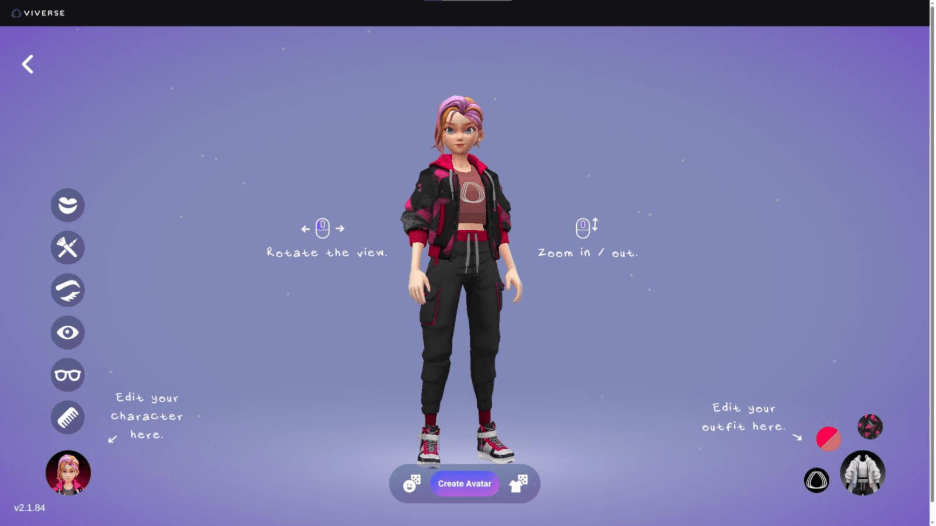
The fastest free path is the VIVERSE Avatar Creator. It runs in your browser with no install, and you start from a Stylized Avatar base character. You can customize the hair, outfit, colors, and proportions. Then you export the result as a VRM file from “My Avatar” > “Export” (VIVERSE Avatar, 2024). The VRM exports with ARKit-compatible blendshapes baked in, so Perfect Sync face tracking works out of the box.
From the team: First-time creators routinely have a working VRM in 10 to 15 minutes with the VIVERSE Avatar Creator. The big win is that the exported file is yours to use anywhere VRM works, not just on VIVERSE.
VRoid Studio (Free Desktop)
Pixiv’s VRoid Studio is the free desktop standard for anime-styled VRM avatars. It’s available on Windows and macOS, with deep customization across faces, hair, and outfits. Most users hit a workable first model in 1 to 2 hours. Watch the license settings before commercial release.
Blender + UniVRM (Full Control)
Blender with the UniVRM exporter is the power-user path. You model, rig, weight-paint, and texture from scratch, then export through Unity using UniVRM. Plan 20 to 40 hours if you’re new to Blender. The result can look like absolutely anything, which is the appeal.
Buy or Download Pre-Made Models
Booth.pm, VRoid Hub, and Sketchfab are the main marketplaces. Free models exist. Paid models typically run from USD 30 to USD 300. Always check the file’s license metadata for commercial use, redistribution, and modification permissions before you ship.
VRM Models 0.x vs 1.0: What Changed?
VRM 1.0 is the stable spec, released in September 2022 (VRM Consortium, 2022). VRM 0.x is the older revision still in heavy use across older tooling. The difference matters when you pick software for your avatar.
The spec rename is the headline change. The component called BlendShape in VRM 0.x is called Expression in VRM 1.0. Material handling also improved, with MToon (the popular toon shader) getting more refined controls. UniVRM, the standard Unity importer and exporter, can migrate VRM 0.x files to VRM 1.0 automatically (UniVRM GitHub, 2024).
Software support is split. VSeeFace only reads VRM 0.x (VSeeFace, 2024). Warudo supports both versions. If your VTuber app is on the older side, export as VRM 0.x to stay safe. For VIVERSE and most newer browser-based apps, VRM 1.0 is the better long-term pick. That’s the version the standard is moving toward.
What’s Next for VRM in 2026 and Beyond?
The biggest forward signal is the Khronos collaboration. With glTF and VRM heading toward joint international standardization, VRM rides the same Web-native rails as WebGL and WebGPU. Those rails already reach every modern browser, which means more native VRM support inside web 3D engines, not less.
The second signal is face tracking. ARKit-ready VRMs use the 52 Perfect Sync blendshapes (VMagicMirror docs, 2024). That lets any iPhone drive lifelike facial expression in real time. No studio gear required, and that’s already shifted the VTuber economy. Indie creators crossed 50% of total VTuber watch time for the first time in Q1 2026 (StreamsCharts, April 2026). The shrinking gear gap is one big reason.
The third signal is market scale. The VTuber market is projected to hit USD 4.94 billion by 2031, growing at a 9.56% CAGR (Mordor Intelligence, 2026). The 3D avatar segment is the fastest-growing slice, with VRM as the file format powering it.
Frequently Asked Questions
The VRM specification itself is open source under the MIT license (VRM Consortium, 2024). That makes the format free to use commercially. Individual VRM models, on the other hand, carry their own license metadata. Always check the file’s permission settings before you ship paid content with it.
Not directly. VRChat uses its own .vrca avatar format. You can convert a VRM model to a VRChat avatar in Unity using community tools like VRM Converter for VRChat. Plan extra setup time. VRChat-specific features like full-body tracking need configuration that doesn’t live inside the VRM file.
FBX is a proprietary Autodesk format designed for generic 3D content (meshes, rigs, animations). VRM is open, glTF 2.0-based, and built specifically for humanoid real-time avatars. A typical VRM file is 5 to 50 MB, while a comparable FBX is usually several times larger (vrm.dev, 2024).
Yes. You can drag and drop any VRM file directly into VIVERSE to use it as your avatar. You can also create a brand-new VRM from scratch inside the free VIVERSE Avatar Creator. Then export the file for use in any other VRM-compatible app (VIVERSE Avatar, 2024).
An ARKit-ready VRM includes the 52 facial blendshapes Apple’s ARKit face tracking uses (VMagicMirror docs, 2024). That set is also the basis of the Perfect Sync standard. Apps like VSeeFace, Warudo, and iFacialMocap can drive those blendshapes from a compatible iPhone. The result is lifelike facial animation with no studio gear.
The Bottom Line
VRM is the open 3D avatar format that solves portability for VTubers, virtual worlds, and the immersive web. One file, dozens of compatible apps, and a spec backed by The Khronos Group and the VRM Consortium together. The fastest free path is the VIVERSE Avatar Creator in your browser. The result’s yours to use anywhere VRM is supported, with ARKit-ready blendshapes baked in. If you’ve been waiting to ship a 3D avatar, the tools are finally ready. Start with the VIVERSE Avatar Creator or browse more VTuber guides for setup help.