Anime Character Creator: Free 3D Anime Avatar Tool You Can Use Right Now

The global anime market reached $37.7 billion in 2025 and is projected to grow at 9.2% annually through 2033 (Grand View Research, 2026). Most anime character creator full body searches land you on flat image generators. They produce a PNG. They don’t produce a character you can move, animate, or take into a virtual world. The VIVERSE Avatar Creator does. It builds a real 3D full-body anime character, exports a VRM file, and runs in your browser for free.
TL;DR
- VIVERSE offers a free, browser-based anime character creator full body tool that exports 3D VRM avatars ready for metaverse, VR, and VTubing use.
- The global anime market reached $37.7 billion in 2025 and is projected to grow at 9.2% annually through 2033 (Grand View Research, 2026).
- You can customize hair, face, body, and clothing without installing any software, then export your VRM file in minutes.
Is VIVERSE an Anime Character Creator Tool?
VIVERSE partnered with pixiv in July 2022 to launch a VRM-native anime avatar builder (GlobeNewswire, 2022). The tool lives at VIVERSE Avatar. It builds full-body 3D characters, not flat illustrations. Three style tracks are available: an anime/character style for stylized looks, a basic illustrative style for a cartoon appearance, and a photo-based track for realistic avatars. Each avatar option is free, browser-based, and work on PC and mobile.
The creator covers every part of the body. Hair style, hair color, eye shape and facial features, clothing, and accessories each have dedicated options. Open the page, sign in with your free VIVERSE account, and you’re building in seconds.
Our take: Most tools ranked for “anime character creator full body” generate a 2D PNG. Very few, if any, of the top search results export a VRM file you can actually use. VIVERSE is the free, browser-based solution in this search space that outputs a real 3D avatar. You can load it directly into Unity, VSeeFace, or a VR headset without conversion.
How Do You Create Your Full Body Anime Character in VIVERSE?
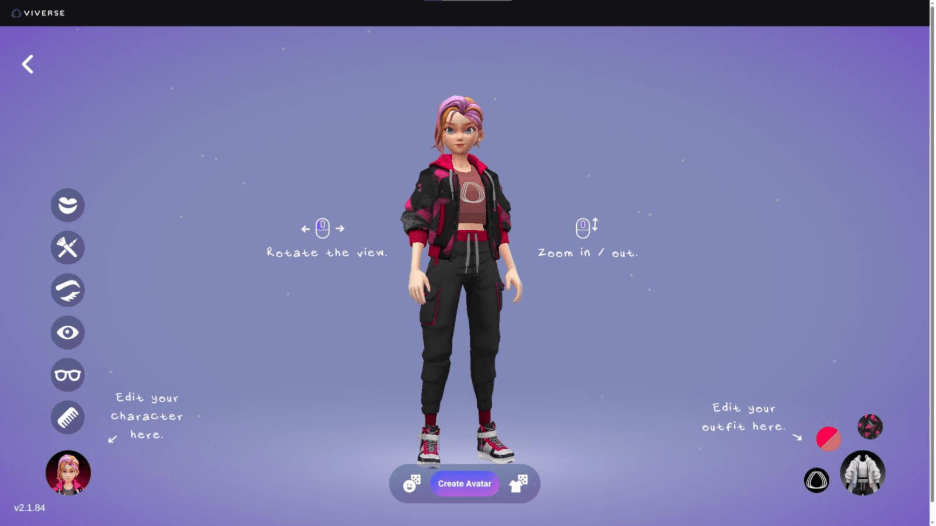
Creating a full-body anime character in VIVERSE takes under ten minutes for a first build. Here’s how the Stylized Avatar creator works, start to finish.
Step 1: Open My Avatars and start a new Stylized Avatar
Sign in to your VIVERSE account and open My Avatars. Select Create Avatar, then choose Stylized Avatar. You’ll land on the character interface with a full-body preview front and center, so you can see every change as you make it.
Not sure where to start? Hit the appearance randomizer at the bottom center of the screen. It shuffles hair and facial features automatically. There’s a separate outfit randomizer too. Both are a great way to brainstorm combinations before you commit to anything.
Step 2: Pick your base character
Choose one of the eight VIVERSE Stylized characters as your starting point: Eun, Jack, Michael, Zack, Miko, Lucy, Yaya, or Iris. Each is a fully built character you’ll customize from here. You can adjust anything in any order before you finalize, so there’s no wrong place to begin.
Step 3: Style your hair
Select a hairstyle from the library, then set a primary and secondary color using the color picker. Hair makes a big first impression, and the two-tone color options make it easy to go natural or vivid.
Step 4: Fine-tune your face
Adjust brows and lashes (shape and color), eye color, lip color, and makeup and graphics (shape, placement, and color). Glasses are here too: choose a frame style and pick between clear lenses or colored sunglasses lenses. Each change updates the preview in real time, and you can revisit any of these options before you save.
Step 5: Choose and customize your outfit
Select an outfit style: bodysuit, coveralls, jacket and capris, or a tailored business suit. From there, set a primary color, an accent color, and a fabric pattern from the pattern library. You can also upload a custom image or logo to use as a fabric print. Keep the image close to 256x256px for the best result. Accented areas differ by outfit, so it’s worth trying a few styles to see how pattern placement works with each one.
Step 6: Do a 360 check
Rotate your avatar to review it from all angles before saving. This is your last chance to catch anything before it’s locked in.
Step 7: Create and export your avatar
Click Create Avatar. You’ll be asked to confirm. Once you click through, your Stylized Avatar is saved to your avatar library and set as your active avatar by default.
To use it outside VIVERSE, go to My Avatars, select the avatar, and export it as a VRM file. That file works in VTubing software, VR applications, and any platform that supports the VRM format.
What Can You Do With Your VIVERSE Anime Avatar?
Your VIVERSE anime character isn’t locked to one application. VRM is an open, portable format. That means your avatar can go wherever VRM support exists.
Avatar identity in virtual spaces is something people feel strongly about. A 2024 qualitative study on Social VR identity found that many users actively design avatars to express sides of themselves that don’t map directly to their physical appearance. For a deeper look at what that means, check out our breakdown of the key takeaways from the 2024 Metaverse Identity Survey.
Use it in VIVERSE experiences. Your avatar loads automatically in VIVERSE when you’re signed in. Attend virtual concerts, explore user-created spaces, and join live events as your character.
Stream it as a VTuber. Import the VRM into VSeeFace or VTube Studio. VTubers hit 500 million watch hours in Q1 2025, a new all-time record (Streams Charts, 2025). Your VIVERSE avatar is ready for that audience the moment you export it.
Use it in VR headsets. Load the VRM into VR applications that support the format. The Khronos Group and VRM Consortium announced collaboration on ISO standardization in October 2024. Compatibility will only expand as that standard matures.
Edit it further in VRoid Studio. Export the VRM from VIVERSE and open it in VRoid Studio for deeper mesh-level edits. You can also go the other direction: build in VRoid and import the result into VIVERSE.
How Does VIVERSE Compare to Other Anime Character Creator Full Body Tools?
The VTuber market is valued at $3.07 billion in 2025 (Market Research Future, 2025). It’s forecast to reach $19.95 billion by 2035, a 20.59% annual growth rate. That growth is driving demand for accessible, full-body anime avatar tools. Here’s how the main options stack up.
| Tool | Output | Cost | Browser-based | VRM Export | Full Body 3D |
|---|---|---|---|---|---|
| VIVERSE Avatar Creator | 3D character | Free | Yes | Yes | Yes |
| VRoid Studio | 3D character | Free | No (desktop app) | Yes | Yes |
| Artbreeder | 2D image | Free/paid | Yes | No | Partial |
| Picrew | 2D image | Free | Yes | No | Partial |
| Character.ai | 2D image | Free/paid | Yes | No | No |
VRoid Studio is the closest alternative. It has deeper customization options and a larger community asset library. But it requires a desktop download and a steeper learning curve. For most users who want quick VRM output, VIVERSE gets you there faster. No desktop download, no rigging setup, no friction.
Our take: Why does the VRM output matter? Because VRM is the one format that travels. A 2D PNG exists in exactly one place. A VRM file works in VTubing software, VR headsets, game engines, and the VIVERSE metaverse simultaneously.
Start Building Your Free Anime Character Model on VIVERSE
The VIVERSE anime character creator full body tool is free, browser-based, and ready right now. No download. No subscription. Open the creator, spend ten minutes customizing, and walk away with a VRM avatar that works in VR, VTubing software, and VIVERSE worlds.
Frequently Asked Questions
Is the VIVERSE anime character creator full body tool completely free?
Yes. The VIVERSE Avatar Creator is free with no hidden subscription. You need a free VIVERSE account to save and export your VRM. Creating an account takes under a minute and requires no payment information.
Can I use my VIVERSE anime avatar for VTubing?
Yes. Export your avatar as a VRM file from My Avatars in your VIVERSE profile. Import it into VSeeFace or VTube Studio. VTubers logged 500 million watch hours in Q1 2025 (Streams Charts, 2025), and VRM is the format most VTubing software supports natively.
What is a VRM file and why does it matter for anime avatars?
VRM is an open 3D avatar format built on the glTF standard. It carries humanoid rigging, facial expressions, and physics data in a single portable file. The Khronos Group and VRM Consortium are working toward ISO standardization, announced in October 2024. That makes VRM the most future-proof format for portable anime avatars.
Can I import a VRoid avatar into VIVERSE instead of building from scratch?
Yes. Build an avatar in VRoid Studio, export the VRM, and import it into VIVERSE. See our complete import guide for step-by-step instructions.
Does the VIVERSE creator cover full body customization, including clothing?
Yes. The Stylized Avatar creator covers hair, eyes, facial features, makeup, glasses, and a full outfit with color and pattern customization. You can also upload a custom image or logo to use as a fabric print.
Can I edit my avatar after saving it?
Not currently. Once you click Create Avatar and confirm, the avatar is saved as-is. If you want a different look, you can build a new Stylized Avatar from scratch. The randomizers make it quick to find a new direction.
Conclusion
The VIVERSE anime character creator full body tool, also knows as Stylized Avatars, is the fastest free path from zero to a portable VRM avatar. The anime market is growing, the VTuber space is accelerating, and demand for 3D avatars isn’t slowing down. You don’t need expensive software or design skills to participate. Build your character on VIVERSE, export your VRM, and take it wherever you want to go.
For what to do next, start with the VRM export guide or explore how to create custom outfits for your new avatar.