Web Browser Games: No Download, Just Click and Play

Web browser games let you play right inside your browser, with no download at all. There’s no app store, no big installer, and no separate launcher to set up first.
That small shift is changing how players find games. Instead of giving up storage space or sitting through setup, you click a link and start playing.
Think of it like streaming a video instead of downloading the file. You press play, and the experience comes to you. This guide covers how web browser games work and what you can play. It also covers what devices you need and where VIVERSE fits in.
What Are Web Browser Games?

Web browser games run directly in your browser, with no download required. Nothing installs on your computer or phone. Instead, the game loads through web technologies like HTML5 and WebGL.
The biggest win for players is convenience. You can try something new without worrying about storage, installs, or device compatibility. If you have a few spare minutes, that’s enough to jump in.
It’s easy to share, too. A single link can send a friend straight into the game. There’s no “download this first” step slowing things down. That makes group play feel faster and more spontaneous.
VIVERSE is built around this browser-first idea. It hosts modern HTML5 and WebGL games, apps, video, VR art, and interactive experiences. You explore it all without the usual install routine.
Why Browser Games Are So Easy to Start
Players expect fast access. Most of us decide quickly whether a new game is worth our time. A long download or a forced sign-up can lose people before they even begin.
A browser link removes that friction. You open the game first, see what it offers, then decide if you want to stay. That’s a much friendlier first impression.
Links also travel well. A web browser game can live on a landing page, a social post, or a creator’s community. The game comes to players instead of hiding inside one app store.
Better web tech helps, too. Browser play isn’t just simple puzzles anymore. Creators can now build rich 3D worlds and immersive spaces that still run in a normal browser.
What Can You Play in a Browser?
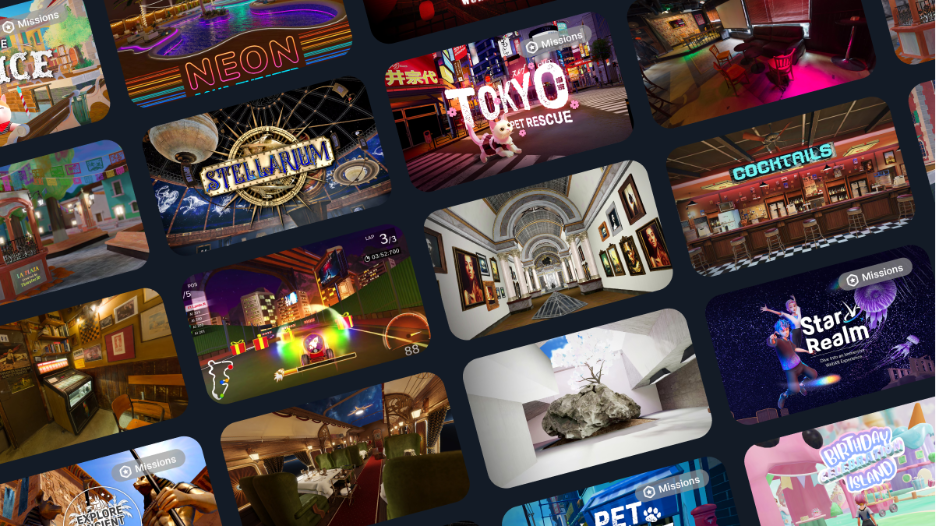
Free online browser games are just one slice of what’s out there. Today’s web games stretch from quick arcade fun to deep, interactive worlds.
Some titles are light and made for short sessions. Think casual mini-games, simple multiplayer matches, and bite-sized challenges. Others lean on 3D graphics and real-time action for a richer feel.
On VIVERSE, creators publish many kinds of content. That includes games, apps, video, VR art, and interactive projects. You can hop between very different experiences from one place.
For example, you might open a casual game from a link, then wander into a 3D art space next. The thread tying it together is easy access. You explore through a browser instead of installing yet another app.
Do You Need an Account or Special Device?
In most cases, no. A desktop, laptop, tablet, or phone is often all you need. The exact requirements depend on the experience and your browser.
That’s a big reason browser games feel so welcoming. You don’t need a console or a pricey rig to start. For many web experiences, a compatible browser is the main thing.
You don’t need a VR headset, either. Some creators add immersive options, but plenty of experiences are made for a standard browser. That keeps things simple if you just want to play.
You can also explore lots of free content on VIVERSE as a guest. Many public experiences need no account at all. Creating a free account just unlocks more features when you’re ready.
Some experiences support multiplayer, and the details vary by title. It helps to skim the description first. Clear controls and device notes make it easy to pick the right game.
How VIVERSE Fits Into Browser-Based Play
VIVERSE is a web-based home for browser games and immersive content. It runs modern HTML5 and WebGL experiences, not the dated formats of older game sites.
It isn’t VR-only, either. Some experiences support headsets, but most are made for a standard browser. You can reach games, apps, video, VR art, and interactive projects from one tab.
Finding something to play is simple. Each experience has a shareable link you can open directly. So you can jump in from a social post, a friend’s message, or the VIVERSE site itself.
For players, that means less hunting and more playing. Instead of juggling many apps, you explore lots of public experiences through one browser.
Play Web Browser Games With No Download on VIVERSE
Skip the installs and the wait. You can play games without downloading a thing, from quick games to video, VR art, and interactive worlds. Lots of it’s free to explore as a guest.
FAQ
Can you play browser games without downloading anything?
Yes. Many browser games run right in a standard web browser. You click a link, the game opens, and you play. No separate software needed.
Are browser games free to play?
Many are, though not all. On VIVERSE, you can explore lots of free experiences as a guest. A free account unlocks more once you want it.
Do browser games work on mobile?
Often, yes. Many run on desktop, laptop, tablet, or phone browsers. Performance can depend on the game, your device, your browser, and your connection.
Do I need an account to play browser games on VIVERSE?
Not for many free public experiences. You can jump in as a guest. An account unlocks more features when you’re ready to sign up.
Do browser games require a VR headset?
No. Browser games and most VIVERSE experiences run in a standard browser. Some creators add VR support, but it’s optional, not required.
What kinds of content can I find on VIVERSE?
VIVERSE hosts games, apps, video, VR art, and interactive experiences. Creators publish modern HTML5 and WebGL projects you can open in a browser.